

This guide will take you through the process of signing in for the first time to Mark and Hanna's wedding site.
Once you have signed in, you will be able to reply to the invitation, see the wedding gift list and do other things to prepare for the wedding.
If you have received an invitation to the wedding, you should also have received a slip telling you your registration code for the website (this will be a nonsensical string of words).
Registration is only available to people who have received wedding invitations.
Step 1: Entering a Registration Code
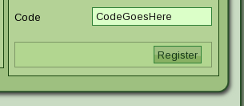
If you did not get a registration code with your invitation or have lost it, contact Mark and Hanna to find out what it was.
Go to the login page. Enter your registration code in the register section and click register.
Step 2: Entering Your Details
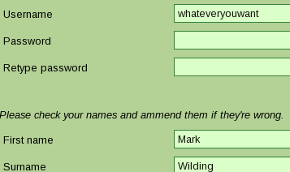
You should now see a page allowing you to set a password and asking for some personal details.
The username and password you set here will allow you to log in on the site in future, so don't forget them.
You should find most of the rest of the form already filled in. Just check the details and ammend them if necessary.
It's important that you enter a valid email address here, because this will be used to contact you relating to the wedding gift list and other things. Don't worry, though: we obviously won't be spamming you!
Done!
You have now registered to use the site. Next time you log in you can use the username and password you set. You won't need your registration code again.
You should now see your guest area home page. From here you can do things like reply to the invitation, view the wedding list and communicate with other guests in the wedding forums.